This program will file SMS to a specific defined folder created in "My Folders" using sender mobile number. Users can define a rule with a specific mobile number or contact to file SMS.
Undefined sender's SMS will be stored in the Inbox as usual.
e.g. Peter's mobile is 91212121, you define a Rule that all SMS from Peter will be automatically stored in "Peter" personal folder in "My Folder".
SMS Manager for S60 3rd Edition
Tuesday, May 13, 2008

Friday, April 25, 2008
Gizmo for S60 v1.1.013
Install the Gizmo client onto your device to start making internet calls and using instant messaging (IM) and Presence. After installing the application you will be able to create an account or use the existing Gizmo username and password. With a WLAN connection you can use the full set of features - and IM and Presence are available even when you are connected over 2G or 3G.
Installation instructions:
1.Install Nokia Internet Services Support Package to the device memory (not to the memory card). Download Nokia Internet Services Support Package
2. Install Gizmo for S60 to the device memory (not to the memory card).
Download for N80ie, E61i, E65, N73 (no VoIP support) and N73 Music Edition (no VoIP support).
Download for N81, N95, N95 8GB (v. 15.0.000 onwards) and N82 (v. 11.0.117 onwards), E51 and E90. Works but not fully tested on: N76 (no VoIP support), 6110 Navigator (no VoIP), 6290 (no VoIP), 6120 (no VoIP), 5700 XpressMusic (no VoIP).
Download for N82 (earlier versions) and N95 8GB (earlier versions)
Note: if you have a previous version of Gizmo for S60 or Nokia Contact Services Support Package installed, please remove them manually before installing new versions.
Installation instructions:
1.Install Nokia Internet Services Support Package to the device memory (not to the memory card). Download Nokia Internet Services Support Package
2. Install Gizmo for S60 to the device memory (not to the memory card).
Download for N80ie, E61i, E65, N73 (no VoIP support) and N73 Music Edition (no VoIP support).
Download for N81, N95, N95 8GB (v. 15.0.000 onwards) and N82 (v. 11.0.117 onwards), E51 and E90. Works but not fully tested on: N76 (no VoIP support), 6110 Navigator (no VoIP), 6290 (no VoIP), 6120 (no VoIP), 5700 XpressMusic (no VoIP).
Download for N82 (earlier versions) and N95 8GB (earlier versions)
Note: if you have a previous version of Gizmo for S60 or Nokia Contact Services Support Package installed, please remove them manually before installing new versions.
Nokia Maps 2.0 Beta
Nokia Maps is taking maps and navigation experiences to the next level and introducing Walk - pedestrian navigation, in addition to Drive - world class car navigation, multimedia city guides, satellite maps and other innovative features. With free maps of more than 150 countries, over 15 million points-of-interest, the world is in your pocket. Don't get lost or choose to get lost in the right places to explore, and let Nokia Maps show you the way.
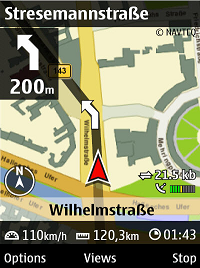
Should work but not fully tested with all devices based on S60 3rd Edition Feature Pack 1, including N81, N81 8GB, N82, N95, N95 8GB, E90. If you are using N95, please make sure you have the latest firmware (20.0.015 or newer). You can update the firmware with Nokia Software Updater.
Navigation features require either built-in GPS or external Bluetooth GPS receiver such as Nokia Bluetooth GPS Module LD-4W.
Download
Nokia Maps 2.0 Beta for devices which have an older version of Maps application installed:
Download (SIS, 5 MB)
Nokia Maps 2.0 Beta for devices without Maps application:
Download (SIS, 4 MB)
Compatible with devices based on S60 3rd Edition Feature Pack 1.
Nokia Map Loader 1.3.5 (English only)
Download (EXE, 10 MB)
Should work but not fully tested with all devices based on S60 3rd Edition Feature Pack 1, including N81, N81 8GB, N82, N95, N95 8GB, E90. If you are using N95, please make sure you have the latest firmware (20.0.015 or newer). You can update the firmware with Nokia Software Updater.
Navigation features require either built-in GPS or external Bluetooth GPS receiver such as Nokia Bluetooth GPS Module LD-4W.
Download
Nokia Maps 2.0 Beta for devices which have an older version of Maps application installed:
Download (SIS, 5 MB)
Nokia Maps 2.0 Beta for devices without Maps application:
Download (SIS, 4 MB)
Compatible with devices based on S60 3rd Edition Feature Pack 1.
Nokia Map Loader 1.3.5 (English only)
Download (EXE, 10 MB)
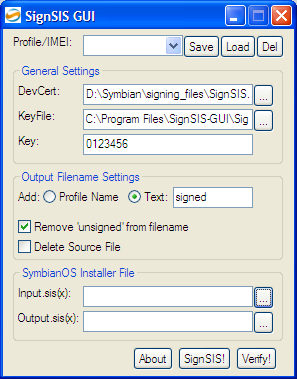
SignSIS-GUI v1.1
you can sign your sis-files or verify if they are signed and you can create profiles if you have more than one symbian 3rd phone so you can quick make signed files for all phones. it will also save the settings on exit so it starts up with the same - so you only have to select the unsigned sis and push the button.
For more info and download
For more info and download
Google Maps 1.70.2 S60v3
Google Maps Mobile has FINALLY been updated to a native S60 application, and even supports the N95's internal GPS! You can see the white GPS dot on the screenshot. Other than that, it looks pretty similar to the old version, only faster since it's native.
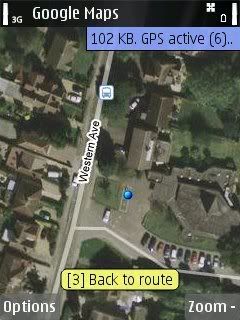
To download Google Maps for Mobile, launch Web browser on your S60 phones and then visit http://www.google.com/gmm.
To download Google Maps for Mobile, launch Web browser on your S60 phones and then visit http://www.google.com/gmm.
cClock v1.17 For Nokia S60 3rd edition.
You need to signed it yourself for the program to work.
You need activate it under Themes->Power saver->cClock vx.xx
You can preview it under Themes->Power saver->cClock->Options->Preview
Please power on/off your phone if you reinstall cClock in order to activate new version of cClock.

Option
If "Power saving mode" is "No", the screensaver will activate the screen for every two minutes. This is to prevent 6120 Classic or 6110 Navigator go into deep power saving mode. This will cause more power drain on the phone.
The option "Backlight" if is "Yes", it will turn on backlight on any key that you press.
"Whole background" if is "No", it will turn of portion of the LCD that is unused. It will only work on some model like 6120 Classic.
"Moving speed" will let you configure the moving speed of cClock.
"Always on top" if it is "No", you can see the "desktop" or program on top if you press any key. If it is "Yes", you will see "cClock" stay on until you unlock the keyboard.
"Icon" will display keylocked, sms, misscall and profile icon.
The "Chinese calendar" option only will work for phone that support Chinese character.
"Battery and network" option will show battery and network strength. ***** WARNING ***** It will drain more battery power in some model. (N73, E70, E50)
cClock version 1.17 unsigned for symbian 3rd
You need activate it under Themes->Power saver->cClock vx.xx
You can preview it under Themes->Power saver->cClock->Options->Preview
Please power on/off your phone if you reinstall cClock in order to activate new version of cClock.
Option
If "Power saving mode" is "No", the screensaver will activate the screen for every two minutes. This is to prevent 6120 Classic or 6110 Navigator go into deep power saving mode. This will cause more power drain on the phone.
The option "Backlight" if is "Yes", it will turn on backlight on any key that you press.
"Whole background" if is "No", it will turn of portion of the LCD that is unused. It will only work on some model like 6120 Classic.
"Moving speed" will let you configure the moving speed of cClock.
"Always on top" if it is "No", you can see the "desktop" or program on top if you press any key. If it is "Yes", you will see "cClock" stay on until you unlock the keyboard.
"Icon" will display keylocked, sms, misscall and profile icon.
The "Chinese calendar" option only will work for phone that support Chinese character.
"Battery and network" option will show battery and network strength. ***** WARNING ***** It will drain more battery power in some model. (N73, E70, E50)
cClock version 1.17 unsigned for symbian 3rd
Best Timer v1.00 Symbian 3rd
BestTimer is a handy software for setting different kinds of timers. Easy-to-use and intuitive interface, Pizza timers, 'Remind me in' timers, and stopwatch with 3 modes.

Application consists of 2 views - Timers view and Stopwatch. You can switch between them with left and right keys.
Timers view
In this view you can add any number of custom timers. You can set timer name, time to count down, a signal to be played when the time is over and its volume .
Stopwatch
Want to check how much time some action can take? Stopwatch allows you to measure elapsed time. Pausing functionality, ability to snap time at any moment (split time feature), multiple lap time, and much more.
Compatible devices:
Nokia 3250, Nokia 5500 Sport, Nokia 6110 Navigator, Nokia 6290, Nokia E50, Nokia E60,
Nokia E61, Nokia E61i, Nokia E62, Nokia E65, Nokia E70, Nokia E90, Nokia N71, Nokia N73, Nokia N75, Nokia N76, Nokia N77, Nokia N80, Nokia N91, Nokia N92, Nokia N93, Nokia N93i, Nokia N95
Download
besttimerv1_00.sisx
Application consists of 2 views - Timers view and Stopwatch. You can switch between them with left and right keys.
Timers view
In this view you can add any number of custom timers. You can set timer name, time to count down, a signal to be played when the time is over and its volume .
Stopwatch
Want to check how much time some action can take? Stopwatch allows you to measure elapsed time. Pausing functionality, ability to snap time at any moment (split time feature), multiple lap time, and much more.
Compatible devices:
Nokia 3250, Nokia 5500 Sport, Nokia 6110 Navigator, Nokia 6290, Nokia E50, Nokia E60,
Nokia E61, Nokia E61i, Nokia E62, Nokia E65, Nokia E70, Nokia E90, Nokia N71, Nokia N73, Nokia N75, Nokia N76, Nokia N77, Nokia N80, Nokia N91, Nokia N92, Nokia N93, Nokia N93i, Nokia N95
Download
besttimerv1_00.sisx
Subscribe to:
Posts (Atom)